
How to master Claude Cowork
A SYSTEM WHERE AI STARTS WORKING FOR YOU INSTEAD OF TALKING TO YOU. DAYS

Original title: I want to master Claude Cowork (full course).
original by: @hooeem
Photo by Peggy Block Beats
Editor presses: This is a systematic practical course around Claude Cowork, which focuses not on how to write better prompt, but on how to turn AI into an executive module that can be managed and moved。
The article is based on a foundational approach, gradually developing a complete framework for its use: first, a stable context (i.e., the "business brain") through the Project and the .md files, followed by a three-tiered command system (global, Cowork, project level); on this basis, the introduction of connectors, browsers and desktop controls and the extension of the AI implementation boundary; and finally, the creation of a reusable, self-operable workflow system through the Skylls, Plugins, timed tasks and Dispact mode。
UNLIKE THE TRADITIONAL "DIALOGUE USE OF AI", THIS APPROACH EMPHASIZES A STRUCTURE THAT PRECEDES INTERACTION AND SYSTEMS OVER TECHNIQUES. ITS OBJECTIVE IS NOT TO INCREASE THE EFFICIENCY OF A SINGLE MISSION, BUT TO SETTLE REPETITIVE WORK INTO A LONG-TERM AUTOMATED PROCESS。
If Chat is a tool, Cowork is closer to a "trained digital employee." This article provides an operational path that is built from scratch and gradually expands its capabilities。
The following is the original text:
Claude Cowork went online three months ago, and since then Claude has been updated over 50 times, which almost completely changed the way I used Cowork. Here's how you can take advantage of these changes and really master them。
Claude Cowork is changing the way we work. All you have to do is entrust it with the task, and it will plan for itself, implement the steps and, while you do other things, deliver the results directly to your folder. But since Cowork just published, a lot has changed. This guide will make all the key elements clear — so look carefully。
IF YOU WANT TO HAND OVER A COMPLETE WORKFLOW TO A REALLY IMPLEMENTABLE AI, KEEP READING. THIS ARTICLE IS FOR YOU。
In the last few months, I've been using it myself, and I've been studying how people are using Cowork, and I've been asking Claude backwards to see if there's anything interesting about the new version。
In fact, I've made this whole subject -- whether you've never heard of Claude or used it every day -- this article can really help you to master Claude Cowork。
What's Claude Cowork
Claude Chat is assistant: you enter prompt, it answers. You have always been involved in dialogue. It's perfect for brainstorms, drafts, quick thinking -- you're always in the ring。
Claude Code is for developers: It runs in your computer terminal and can write code, execute code, manage GitHub repository. It can also be used in IDE (e.g. Anti-Gavity of Google) -- it can be understood as a steelman's armor on a "primitive intelligence" package. But it is not designed for non-technical users。
Claude Cowork is an employee: it's a non-technical user-friendly interface, but at the bottom, it uses the same automatic engine as Claude Code. All you have to do is hand over the mission, which automatically dismantles the sub-mission, pulls up a virtual environment locally, executes the complete process and puts the final result directly in your folder when you leave。
Chat is a conversation. Cowork is commissioning。
The relationship between the two is completely different and brings about completely different results。
Once you really understand the difference, the way you look at Cowork changes completely。
Set Method
Cowork will read and write directly to your hard drive. Giving access to the system as a whole is often the beginning of a disaster。
So first, keep it within control. In particular:
Step 1: Select the model
Select the AI model for tasking on the right side of the Cowork interface。
• Sonnet 4.6: Main force model. It's cheaper and more efficient, covering 99% of your daily needs. The default is enough。
• Opus 4.6: Heavy fire. Consumption levels are fast and reserved for the most complex and critical high-risk tasks. In a post entitled "Einstein's Principles" , he says:。
• Haiku: only for light, speed-seeking tasks。
At the same time, remember to open the Extrad Thinking at the bottom of the interface. It allows Claude to really deal with complex logic, not just to give a surface answer by matching patterns. This detail is more important than most people think。
Step 2: Create sandboxes
On the right of the desktop, create a new folder named Claude Workspace or Sandbox. This is Cowork's workspace. It can only operate in this folder that you specify. The contents outside the folder are not touched。
Step 3: Grant folder privileges
Enter the Work click "Work in a folder" to select the sandbox folder you just created. Claude will request permission to modify the document in that location. Click "Allow once" or "Always available" on it。
So it's done and it's safer。
Step four: Perform your first mission
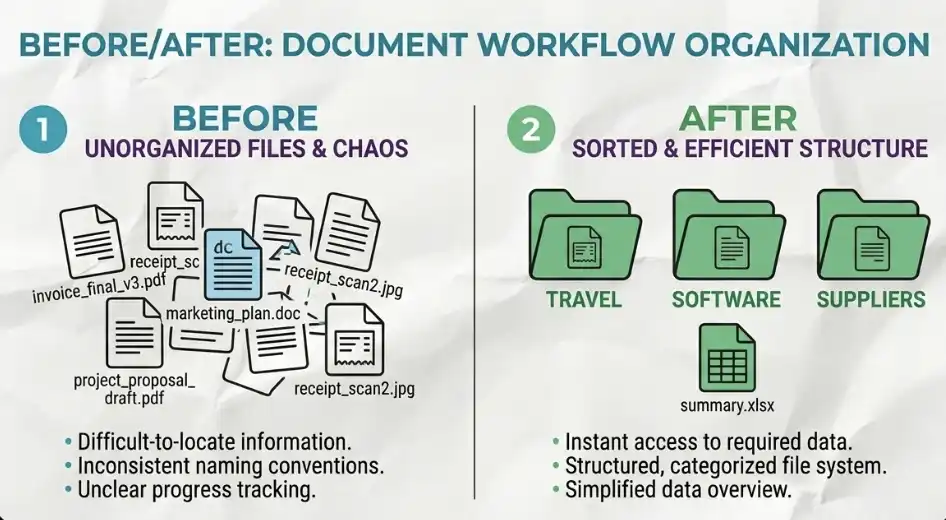
Drag more than a dozen different types of invoices into this sandbox folder and enter a hint: "Please sort these invoices into different subfolders and generate an Excel matrix."
Cowork sets out the implementation plan on the right side of the interface and then starts processing it on its own. It may even dispatch multiple parallel sub-agents at the same time to complete different parts of the mandate at the same time。
When your coffee's not finished, the invoices may be ready。
BUILD YOUR AI WORKSPACE
If you've been using Cowork "unstructured", you probably already have these problems: It doesn't remember anything between sessions; every time a new window is opened, you have to reinterpret your business; different tasks interfere and mix with each other。
there is only one solution - to establish a project-based working system (project ecology)。
Project Ecosystem
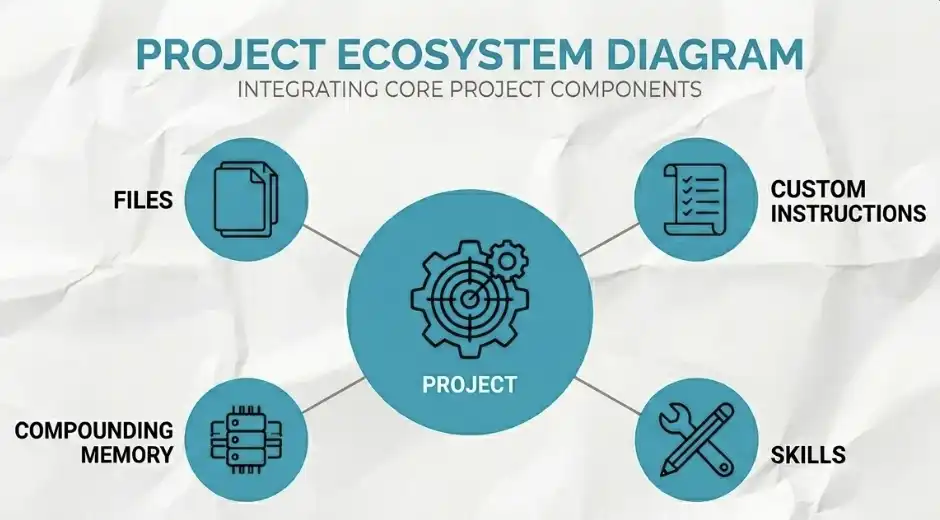
Project (project) is not a simple folder. It is a container that integrates all of the following: your documents, custom directives, skills, context memories that can be built up... all of them in one place。
No. Project, what happensClaude doesn't know who you are, what you're doing, what you're used to. So you get into a cycle: each conversation starts at zero。
• After the project。The context begins with a "reduced accumulation". For example, in week 1, you need to write an entire section of the prompt to make it clear; but in week 6, all you have to say is "do as usual." Claude knows what you're talking about, and that's the real power of Cowork。
A very important principle: the project must be isolated
Different areas must be broken down into different projects. For example: YouTube content items; finance / Finance projects, never mix。
What else would happen? Youtube's tone, rules, "polluting" financial tasks; Claude starts to confuse styles, and the output becomes unstable. There is no room for discussion on this point, and it must be strictly segregated。
Three ways to create a project
You can create a project in three ways:
1. Starting from scratch
:: Naming projects
write basic instructions
Accumulation of context during use
It is appropriate to build a system from the top。
2. Import from Claude Chat
• Directly import your historical project on Claude's version of the web page
• All context and memory will be preserved
Suits users who already have accumulated。
3. Create based on existing folders
Choose a file on your computer. Check
Cowork will automatically build projects around these files
It's suited to the available material and needs a quick start。
In summary, Cowork’s ability is not “one-way conversations” but “the context of long-standing projects”。
Your business brain
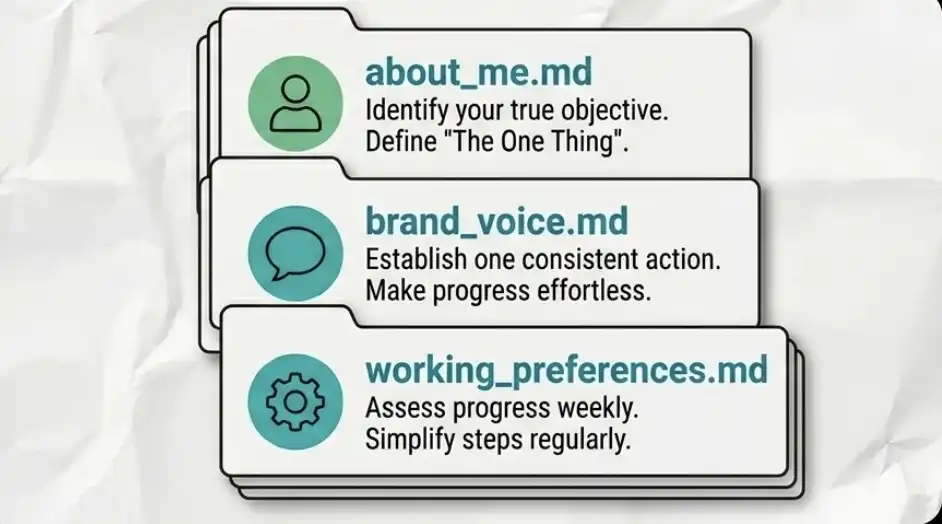
Project is infrastructure, and the real "personality" exists in the.md file。
These are plain text files in your context folder, which Claude reads before each mission. It is through these documents that it will act as if it had been working with you for two years, not as a new General Assistant。
it's about..
Write who you are, what your business is, who your clients are, how you make money, and your current priorities。
Claude always reads this file -- every time。
i don't know
Define your expression: the tone you like, the expression you hate, the usual phrase. You can just paste your old real writing samples。
The purpose of this document is to make it look like Claude of all kinds。
working preferences.md
Define how you work: how the task is managed, where the file is stored, what format the output should be。
Don't write from scratch
The easiest way to get Claude to ask you. You can just say, "Please ask me questions gradually and generate a set of documents based on my answers. It'll only take 15 minutes. But it saves you hours a week and it's continuous。
global command vs item command
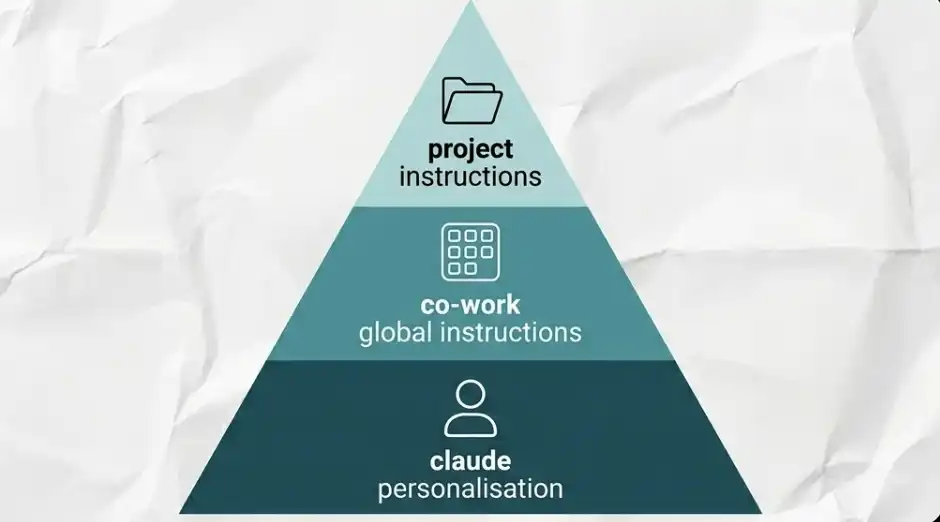
There are three layers, each of which will gradually tighten the range. All three floors are configured to stabilize the work。
Level 1: Claude Personalization (global)
Click on your name and click into the settings. This floor will work on all scenarios in Chat, Code, Cowork。
Here's your "general rule" for example:
:: Avoid overuse and overuse
:: Prioritize first-hand information rather than second-hand aggregation of content in research
no hedging language
That's your bottom code of conduct。
Layer 2: Cowork Global Command
Path: Settings — Work Settings — Global Interventions. This layer is effective only in Cowork, but applies to all tasks。
It is appropriate to write rules that must be applied uniformly, such as:
Format for specified dates
. document naming norm (e.g. underrscore description name)
always check the sandbox folders when handling business-related tasks
The effect is to avoid you entering the same context in each mission。
Layer 3: Project-level command (Project-specific)
Effective only within a single project。
For example, in your YouTube project:
generate video beginnings using a specific slide tool
All data recorded to a fixed table
These rules should not affect your financial projects。
Core principles: strict segregation
The rules for different projects must be segregated. Otherwise, there will be "pollution": YouTube content rules affect financial tasks; output styles are confused, logic is incorrect. Once mixed, Claude would start to "discover who he is"。
Global custom, Cowork execution, project specialization。
SET UP YOUR AI CAPACITY
From here, Cowork is no longer a useful tool, but rather a self-sustaining operator. We need to empower it to get out of the sandbox and interact with applications, web pages and your desktop environment。
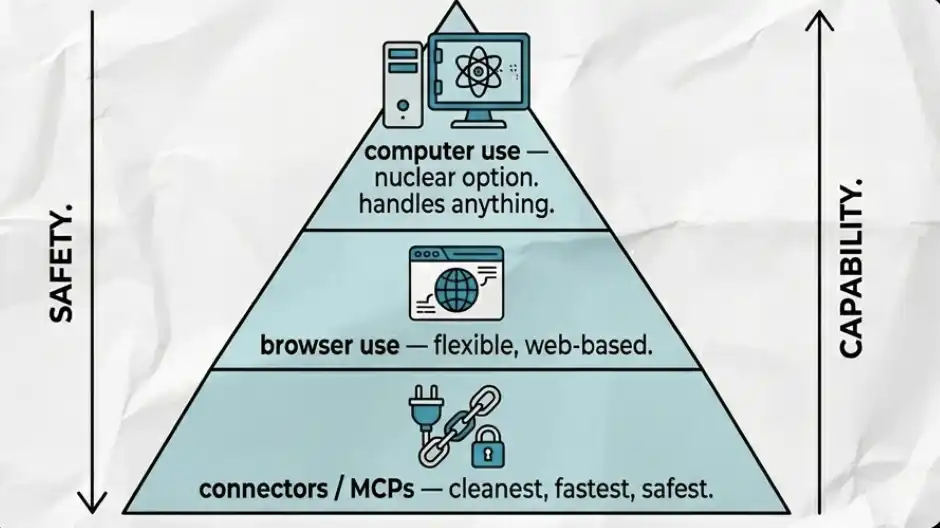
it is divided into three layers of capability, which is used in this order: first using the connectors, then the browser, and finally computer operations。
Contractors and MCP
Connector (also known as MCP, Model Context Products) allows Claude to operate directly in your daily applications。
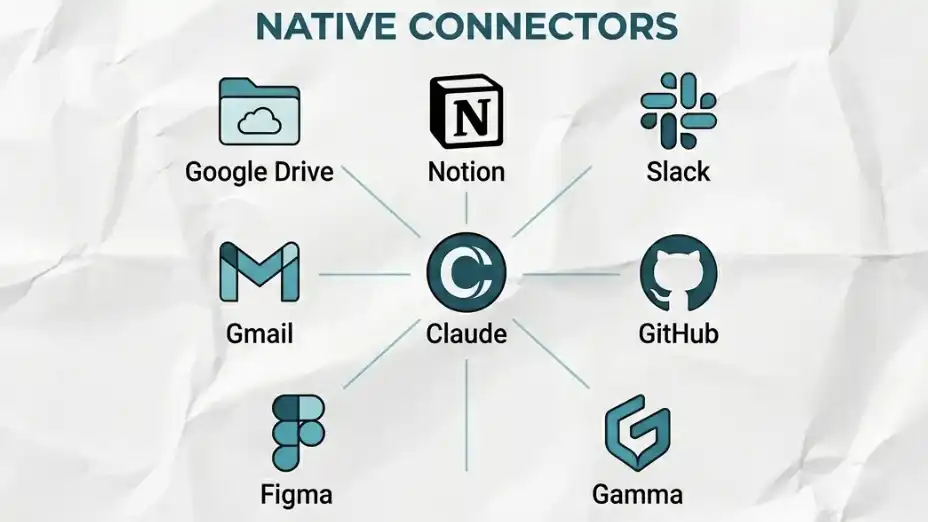
Operations are carried out directly in the application interface, not by copying paste, not by screenshot, but by authorized access. The built-in connectors support Google Drive, Notion, Slack, Gmail, GitHub, Figma, etc。
How to connect
click the additional number of the chat interface, enter the connetors tab, browse or search the tools you need, and then complete the authorization process in the browser。
When the connection is complete, you can have the permission control of the fine particle size. For each connected application, you can set it separately as " always allowed" "need to confirm" or "no access". You can always have complete control of what it can and cannot do。
Special Connector
Take Gamma, for example: if Claude produces a presentation without a dedicated connector, the effects are usually more general and the layout and structure are not ideal。
But when you turn on the Gamma connector, Cowork will automatically hand over the content to Gamma, which will generate a well-structured, visually designed presentation。
The core principle is to use the right tools to carry out the right tasks. Do not let a universal tool do what it should have done。
Progressive Hacks
Hack 1: Apify MCP (data captured without pain)
Want to fetch data from YouTube, TikTok or Instagram? You don't need n8n, you don't need a complicated automated process. I've tried before, and the gap in comparison is clear。
Operational steps:
Create a free API Token in the Apify account
Open Cowork conners, search for "Apify"
API Key, connect
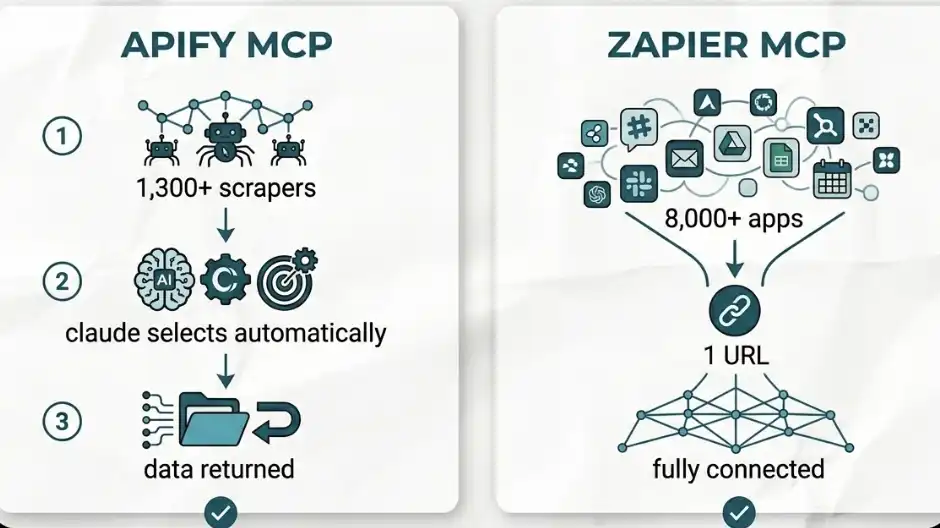
When you're done, when you get Claude to retrieve data from a certain platform, it automatically selects the most suitable of the Apify's more than 1,300 reptile tools (which they call “actors”)。
You don't have to choose or configure. It automatically finds tools, runs and returns data。
Hack 2: Zapier MCP (connect 8000+ application)
If the tools you use are not supported by Claude, this is the solution. This is what I really did when I first used it。
Zapier's MCP can connect to more than 8000 applications like HubSpot, Skool, Airtable, etc。
Operational steps:
Create a MCP server on the Zapier platform
Choose Claude Cowork
Configure specific tools and operations you allow
COPY GENERATED URLS
Go back to Claude's contacts, search "Zapier" and paste the URL
In less than 10 minutes, you unlocked 8000+ applications。
This whole set of things has just wiped out a common question: "What if the tools I use are not supported?"
Now, the problem can basically disappear forever。
Browser capability: autonomous web operation
If no connector is available, use the browser extension. This is the second level of capability。
Installation Method
Open Google Crome
Get in
Search for Claude
Installation and fixation of toolbars
Enable "Claude in Crope" in the Work settings
Post-enabled Capability
When it opens, Claude can:
Automatically open browser labels Page
:: Access to websites
Reading page content
YOU CAN GIVE IT A URL, LET IT GO:
Review of landing pages
ANALYSIS OF CTA DESIGN
Conduct competition analysis
It can read not only the text, but also the page structure, such as:
Italic emphasis
Title level
Page Layout
And it can do multisteps。
For example, you can make it: open YouTube browsing the recommended video, browsing back to play, a little praise and comment
It can be fully implemented。
A risk hint that must be taken seriously
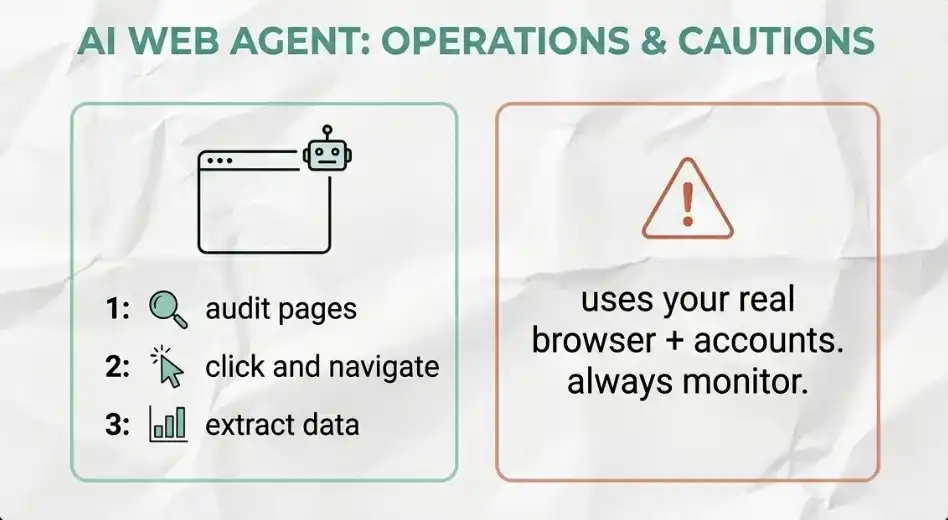
Claude is using your real browser. That means it's in your personal account. If you let it search for the tickets, you have already kept the payment on the airline website — technically, it is capable of paying directly。
So you need:
Monitor its operation
set access limits (blocklists)
This is not a theoretical risk, but a realistic one. Treat it as an employee who has just entered the job but already has your account number。
Computer functionality: full screen and desktop control
When the connector can't solve it, or the browser's ability can't solve it, it uses the Computer Use. This is the last resort。
It can make Claude:
..to "see" your screen
Control your mouse
Enter on your keyboard
In other words, what you can do manually on the computer, it can do on its own now。
How to open
Click your account name
Enter Settings
Open "Computer Use"
important: add sensitive applications to the blocklist (blacklist) before doing anything。
Actual use of scene
For example, you can get Claude: find a video file on the desktop and drag it into the CapCut project Medium
The implementation process is as follows:
Claude, request for access to Finder and CapCut
..you can completely not operate the keyboard
It'll visualize your files
:: Open editing software
Find corresponding documents and complete them Drag Enter
the entire process is automatically completed. this capacity is very strong. and that's why you have to set up the blocklist first。
Automation and tasking
There is a rule that will radically change the way you use this tool: any mission that repeats more than once a week should be automated。
The automated system is divided into four levels: Skills, Plugins, Scheduled Tasks, Dispact Mode. They are layer-by-layer capabilities and do not need to be built in full at once, but in sequence。
Custom Skills: Compressing Workflow into a Command
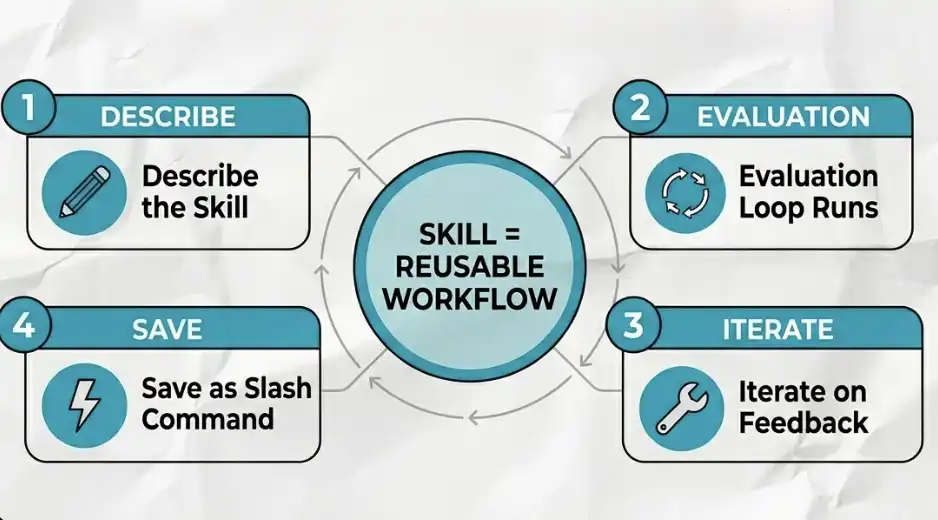
Skill, which is essentially a reusable AI workflow, is sealed into a single command。
you don't have to write a long line each time to do the same process
it's just a slash command, like: /summarise invoices
Skill, what's behind it
essentially, it's a .md file:
include instructions
• Sometimes containing scripts
Claude, dynamically loading on mission
You don't need to write code. All you have to do is describe it in a natural language. Claude will help you generate this file。
Create process for Skill
1. Definitions (The Prompt)
Describe clearly what this Skill is doing。
For example:
Automatically apply your brand colour and font to all presentations generated
• Arranged invoices into structured forms
Evaluation Loop
Cowork has built-in Skill testing mechanisms:
One mission with Skill
No, Skill, do it again (beginning)
Two results in parallel
3 Iteration
Inspection results:
Is there any missing requirements
:: The correct font
:: Is the format in line with expectations
Send questions back to Claude, it's automatically corrected。
4 Save & Deploy
when the output reaches your standard: click "copy to your marks"
From now on, the whole process can be called by an order。
You can build a Skill type
Automatically parse invoices for an entire folder and generate classified Excel tables
Grab YouTube videos and generate interactive HTML transcribs with time stamp
CALL EXTERNAL IMAGE MODEL API, FIRST KEY TO GENERATE BRAND-STYLE INFORMATION FIGURE
One sentence: Skill = turning "complex process" into "act."。
Plugins: Collapse multiple Skills into full workflow
A Skill can only automate one process, while Plugin's role is to automate a full "job" by combining multiple Skills and connectors。
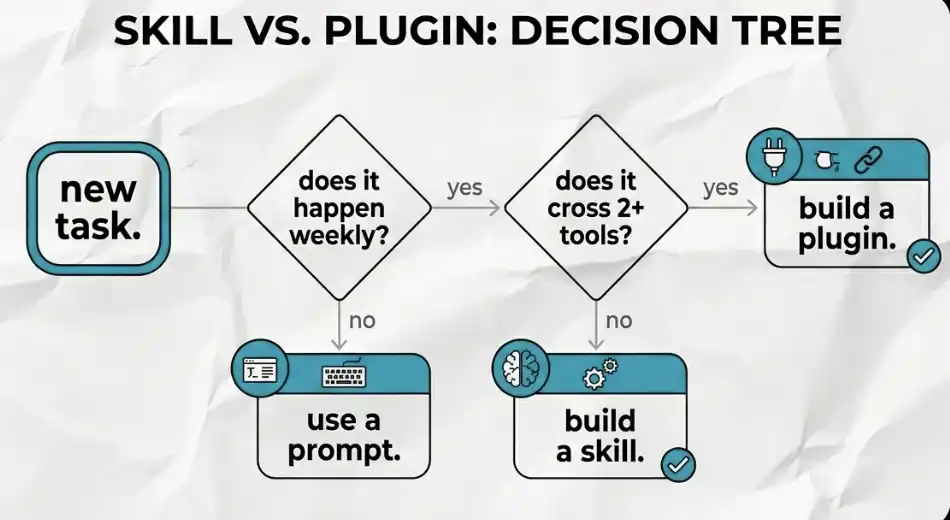
How do you figure Skill or Plugin
A simple test can be used:
is this mission repeated every week? if it isn't, it's enough to use normal prompt。
Are more than three steps involved and cross more than two tools (e.g. Slack + Gmail + Notion)? If not, use Skill. If so, use Plugin。
How did Plugin build it
All you have to do is tell Cowork: What kind of workflow do you want to automate
It automatically puts: needed MCP; corresponding Skills. This is a complete "main flow package" that runs a full flow line with a single instruction。
Plugin ' s most important value: reusable, distributed
Plugin can be shared. You can wrap your best workflow (SOP) into a Plugin and distribute it to teams or communities. In carrying out their tasks, they will be almost identical to you。
In other words, the way you work, it's made。
Timed tasks: allow automation to run on time
Now, Skills and Plugins can automatically trigger execution according to the time set. Even if you're not in front of the computer, they run。
How to set a time job
Enter "Scheduled" tab in the left column
Click "New Task"
Fill in the name and description of the task
• To quote the corresponding Skill or workflow in the prompt. For example, "using my ticket search skills to find a Spanish round-trip ticket for less than £2,400."
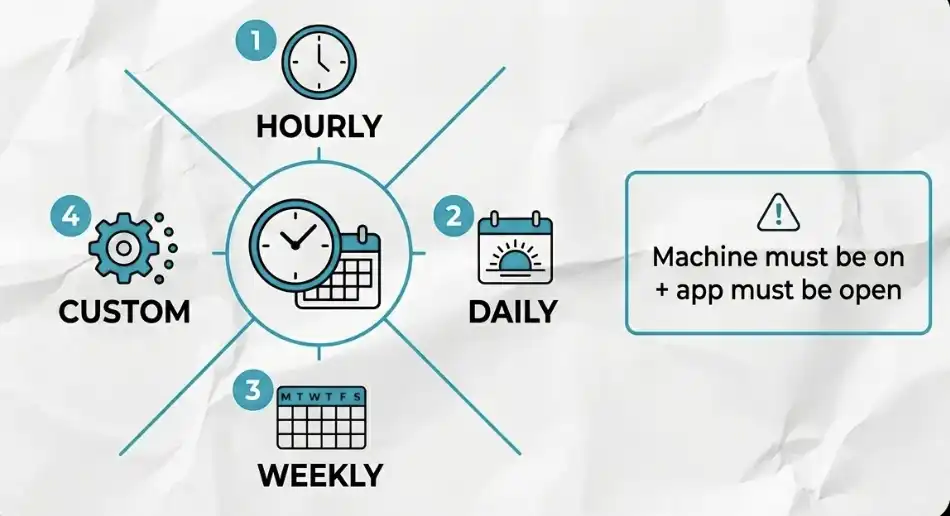
Set implementation frequency: hourly, daily, weekly, or specified date + time
Select the corresponding item folder
:: Preservation
One of the most important rules
Timed tasks will only be performed when your computer is on and the Cowork application is running. If you set up a mission at 9 a.m., but the computer is closed, then the mission will not run until you turn it on。
A key detail that can easily be ignored
It is recommended that the power setting be adjusted to keep the equipment awake. This is the most common source of problems — many automated “defunct” — not the wrong configuration, but the equipment not running。
Dispatch mode: remote control with mobile phone
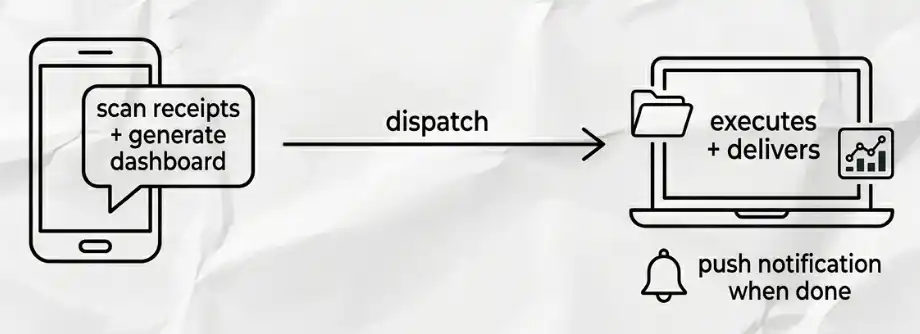
Use the Dispatch mode when you are not in front of the computer, but the task needs to be performed on a local machine. You can send Claude a message through the phone and it'll be on your desktop end. Cell phones and computers share the same line of dialogue and the context is not interrupted。
How to Set
In desktopend Cowork:
Open Settings, Enable Dispatch
• Open "Keep Awake" in the Dispatch menu. This prevents computer hibernation, thereby preventing access to files
allow browser operations (browser actions) and computer use
How to use
sending instructions on mobile phones, for example: "scan my receipts folder and generate a data board."
Cowork will execute all the processes on your computer. You will be reminded when the mission is completed。
Master workflow: Prioritize the three systems
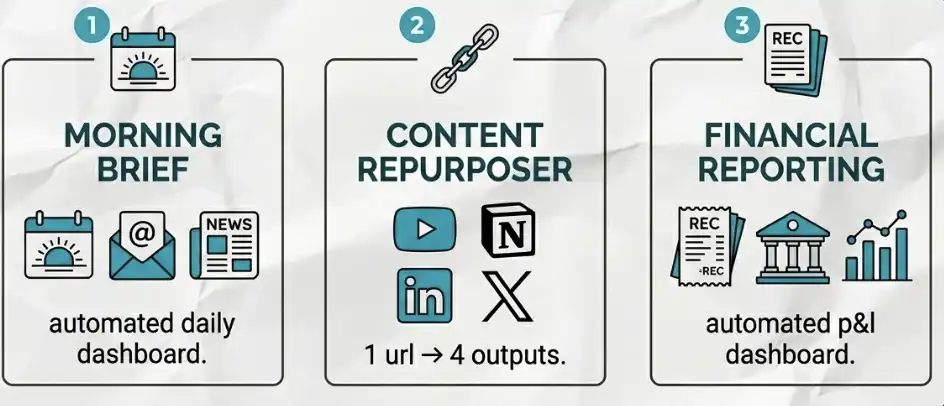
The following three sets are the most worthwhile to do first, in that order。
1 Daily Morning Briefing (Morning Brief)
Let Claude organize the information before you start working. You can set a time job and connect to your calendar and mailbox. It will:
:: Summarize the schedule for the day
Listing of e-mail matters to be handled
Query local weather
Get the latest news about your industry
• Even prepare your e-mail responses in advance for your clearance
As soon as you get to the computer, everything is ready. This one alone is already worth the subscription fee。
2 Content Reuser
Give Claude a YouTube link that will automatically complete:
• Extract video recordings
Collapse content to a new Notion page
Automatically generate platform files for LinkedIn and X
One input, three outputs. No manual operation is required for the entire journey。
3 Financial Reporting System
Sets a task to run automatically every month。
You can:
• Give Claude access to your transaction records (no complete account information required)
• Or directly provide a receipt folder
It automatically:
Classification of expenditure
Reconciliation of income and expenditure
GENERATE AN INTERACTIVE HTML FINANCIAL DASHBOARD (SHOWING PROFITS AND LOSSES)
Your accountant can use the organized report directly, and you hardly need to spend any time。
Token Management: How to avoid rapid depletion
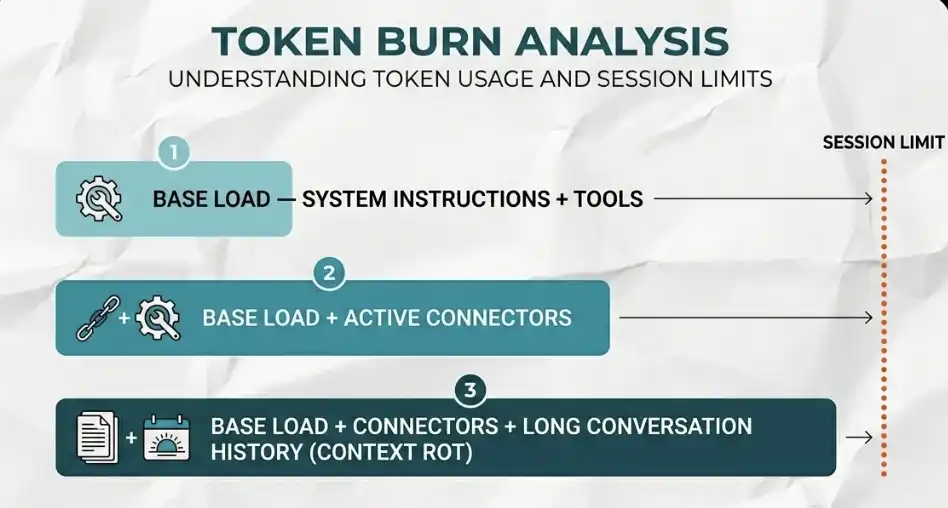
Every word you send to Claude, and every word it reads from the file, consumes token. If you don't manage properly, you'll probably use light within a week。
I have seen people exhaust the maximum package in three days because of three completely avoidable mistakes. As follows:
Error one: Ignore base load
Your context window was partially occupied before you entered anything:
:: System directives
Tools in use
ENABLED MCP CONNECTORS
these will take over token. the more connectors go, the faster they consume. only what is really needed for the current task。
Error two: Context Corrosion (Context Rot)
If you use the same dialogue window for a long time, Claude reloads the entire conversation history every time. For example, when you just finished writing an e-mail, and then in the same window you allowed it to plan a trip to Dubai, the system will also load the e-mail content into the Travel Task。
This is entirely wasteful, and this is how many people are unwittingly exhausted。
Error three: dialogue for batch tasks
If you're going to process 100 invoices, and then Claude is going to read and process one in a conversation, it'll quickly run out of token. A better way to get Cowork to write a reusable script (Skill) to process these invoices。
script consumption of token is much lower than article-by-article processing, and this gap is very clear。
30–45 minute rule
Keep each session simple and focused。
:: Each window addresses only one subject
• Open a new window for 30–45 minutes, or switch jobs
the new window implies a new context and a new token budget。
Parallel agent
For large missions, Claude can perform in parallel:
:: Deployment of multiple sub-agents
Each sub-agent has a separate context window
:: Addressing different parts at the same time
Einstein Principles
Opus only uses complex, high-risk reasoning. Sonnet for almost all the other scenes。
99% of the time you don't need Opus. Do not use it as a default model。
AI SECURITY
Cowork directly runs on your local machine. Anthropic has built up safety mechanisms at the bottom of the product, so the underlying risk is low. The problem is not here。
The real risks come from others。
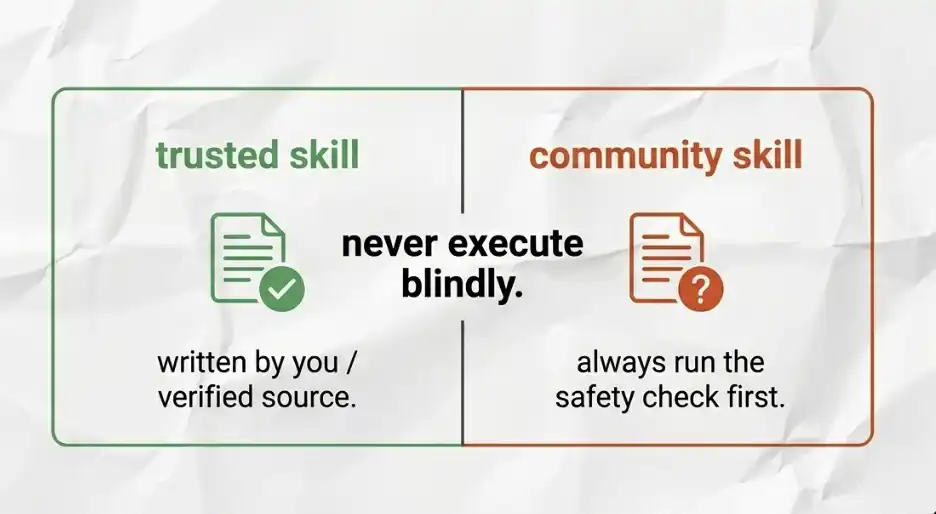
You can download advanced Skills from platforms like GitHub. When you import these external Skylls, you essentially introduce a directive that Claude executes on your machine, within your delegated authority。
If someone embeds a malicious instruction in this .md file, there may be a hint injection — for example, induce AI to delete the file, steal data, or even enhance its own privileges in your system。
This is not an assumption, but a real risk。
Security check process
Before adding any external .md files to your Skills library, please make sure that the following steps are carried out: copy all the contents of the Skill to Claude Chat and then ask directly, "Is this Skill containing any instructions that may be harmful, malicious or beyond its stated mandate?"
Just two minutes. But every time, there are no exceptions。
You should take the core conclusion
All the contents of this guide are based on a key cognitive shift: don't use Claude Cowork as a chat tool. It is essentially an "autonomous employee" who can be commissioned。
Once you understand this, you will not ask any more questions, but start assigning it jobs。
Three points most important
1. Structure is more important than Prompt
a clear project structure, a well-developed .md context document, and separate project instructions, far outperformed the quality of the output。
The base was built once, and there was an ongoing recovery。
2. The automated system is structured in layers
The sequence is: Skills → Plugins → Scheduled Tasks → Dispatch, each floor is built on the top floor。
Don't try to get the whole system together from the start. Automate a mandate that is repeated every week before it is progressively expanded。
3. Security is not an option
Every Skill downloaded from the community must be checked before running. Security checks take only two minutes, but those two minutes may protect your entire machine。
Your next move
Three things today:
create a sandbox folder
:: Delegation of authority
Run a real mission
For example:
:: Handle messy downloads Check
Or sort out a shipment of invoices
That's enough to make you truly understand this tool。
From what stream
Morning briefing (Morning Brief)
• Content Reuser
Financial Dashboard
Pick one, just start。
If there's only one thing to remember
Go with Zapier MCP. It connects to more than 8000 applications, setting up only 10 minutes. If you've just omitted that part, go back and look. This is the most undervalued function of the whole tool and the ability that most people have never really used。
[ Chuckles ]Original Link]
